

Turning Claude Code from a developer tool into a household automation system.
I’ve spent the last several days building something I didn’t know I needed: a comprehensive personal AI assistant that handles the administrative friction of modern life. Not a chatbot I talk to occasionally, but an always-available system that knows my files, my family, my accounts, and my workflows.
This post builds on what I wrote a few days ago, but I’ve gone much further. In fact since writing this post I’ve build many agents for my Job to do things like agregate data from all our Microsoft Word Dashboards so that Claude can answer any question I have and create summaries, reports and analysis.
This post is a detailed walkthrough of what I built, how it works, and why I think personal AI systems are about to become as common as smartphones.
The Starting Point: Claude Code
As a reminder, Claude Code is Anthropic’s official command-line interface for Claude. It’s marketed primarily at developers, but I saw something else: a platform for building personal automation.
What makes Claude Code different from using Claude in a browser:
Persistent context — It remembers our conversation across sessions.
Tool use — It can read/write files, run commands, and interact with external services.
MCP (Model Context Protocol) — A standard for connecting AI to external data sources.
Custom agents and skills — You can define specialized behaviors.
I started with a simple question: What if I could make Claude understand my systems?
The Architecture: Markdown All the Way Down
Here’s the key insight that makes this accessible: everything is just markdown files.
Agents live in ~/.claude/agents/. Each agent is a single .md file that describes:
What the agent does
What tools it can use
How it should behave
Examples of interactions
Skills live in ~/.claude/skills/. Each skill is a folder containing a SKILL.md file that describes a reusable automation.
No complex configuration. Just prose descriptions of behavior. Claude reads these files and acts accordingly. When I want to modify how my filing cabinet agent works, I edit a markdown file.
The Filing Cabinet Problem
I maintain what my family affectionately calls “the filing cabinet” — a OneDrive folder structure with 540+ meticulously organized folders covering every aspect of household administration. Bank statements go in 💰 Financial Records/🏦 Bank Accounts/Chase Bank/Checking Account/Statements/2025/. Medical bills go in the appropriate subfolder under ⚕️ Health Records. Tax documents, insurance policies, property records, vehicle maintenance, kid’s school documents — everything has a place.
The system works beautifully for retrieval. Finding documents is instant. But filing documents? That required:
Opening the PDF to understand what it is
Navigating to the correct folder (often 5–6 levels deep)
Creating year subfolders if needed
Moving and renaming the file appropriately
For bank statements and recurring documents, this was time consuming.
My First Agent: Filing Cabinet Organizer
I created a markdown file (~/.claude/agents/filing-cabinet-organizer.md) that describes the agent’s behavior. The key insight was including a Claude.md file in the filing cabinet root that contains the complete taxonomy. The agent reads this first, then uses that knowledge to make filing decisions.
Now my workflow is:
“File my December Chase statement”
The agent:
Reads the taxonomy
Analyzes the document
Identifies it as a Chase checking account statement from December 2025
Navigates to the correct path
Creates the 2025 folder if it doesn’t exist
Moves and renames the file
Two seconds instead of two minutes. But more importantly: zero cognitive load. I don’t have to remember where things go anymore.
Email as a Task Generator
Modern email is a todo list that other people write for you. Buried in newsletters and notifications are actual action items — bills to pay, events to RSVP to, forms to fill out, things your spouse asked you to handle.
Agent Two: Inbox to Reminder
This agent connects to my Fastmail via MCP and Apple Reminders via HyperContext MCP. When I say:
“Check my inbox for anything from Lora I need to do”
It:
Searches recent emails from my wife
Reads the content looking for action items
Identifies what needs to be done and when
Creates reminders in the appropriate list (Budget & Finances, Travel, Shahine Family)
Sets due dates intelligently (invoices get 2 days before the actual due date, “ASAP” becomes tomorrow at 9 a.m.)
The agent doesn’t blindly create reminders. It presents what it found and asks which ones I want tracked. Then it creates properly categorized reminders with helpful notes including context from the original email.
The Package Tracking Rabbit Hole
I order things online. A lot. Each order generates emails, tracking numbers go to different carriers, and I want everything in my Parcel app so I can see a single dashboard of incoming packages.
Amazon packages auto-sync to Parcel. But everything else — Newegg, B&H Photo, random Shopify stores — requires manual entry.
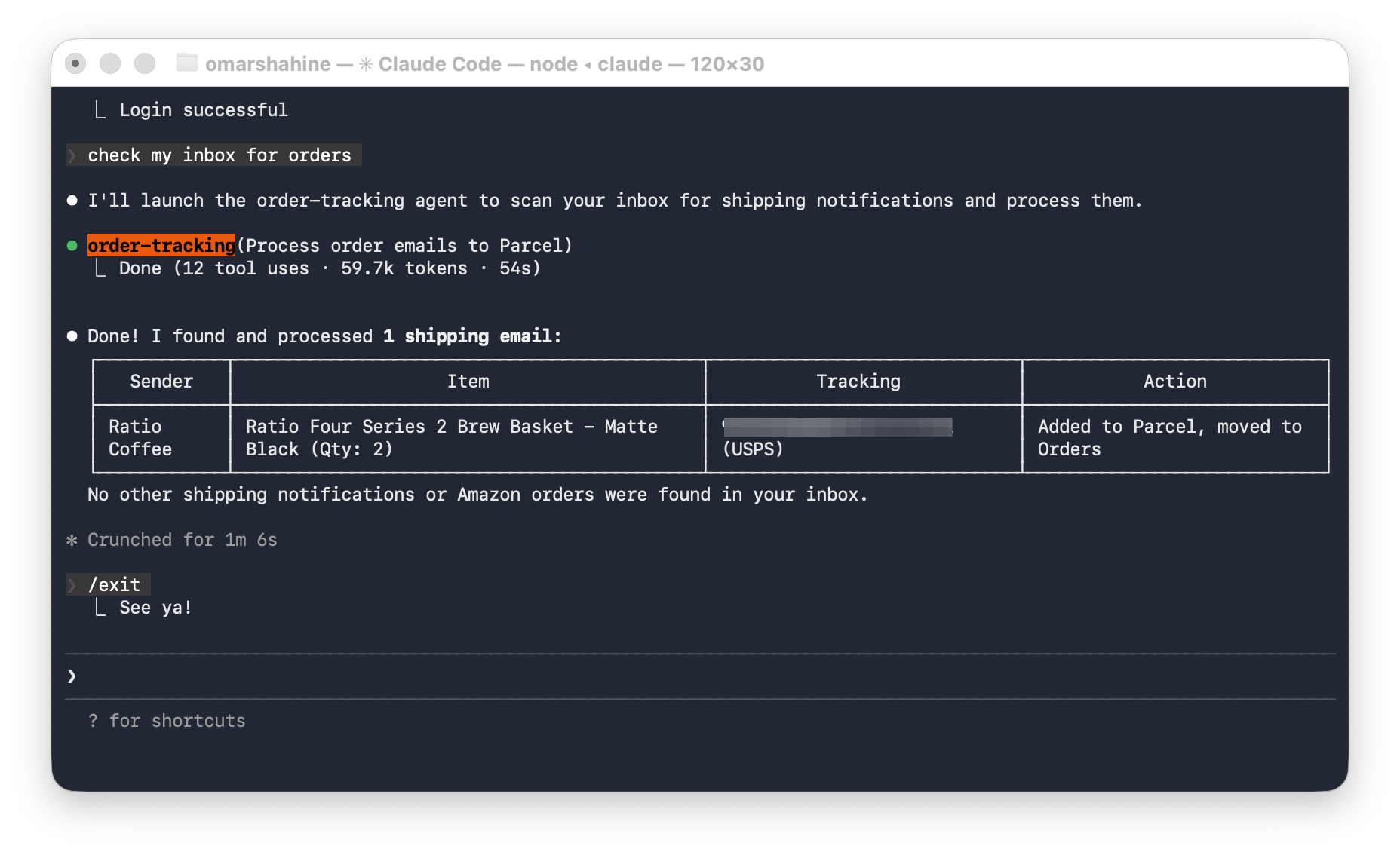
Agent Three: Order Tracking
This one illustrates how I build these agents: by analyzing my own data.
I didn’t try to anticipate every possible shipping email format. Instead, I had Claude examine my actual inbox:
“Look at shipping emails I’ve received in the last month”
“What patterns distinguish actual shipping notifications from order confirmations?”
“What about marketing emails that mention ‘shipping’?”
“Create a JSON config with regex patterns for reliable detection”
The result is a shipping-patterns.json file with:
Subject patterns that indicate real shipments (^Shipped:, has shipped!$, is on the way)
Exclusion patterns for false positives (^Order .* confirmed, shipping soon)
Sender patterns for known carriers and retailers
Tracking number formats for each carrier
Now the agent:
Scans inbox using the patterns to find shipping emails
Extracts tracking from the email body or follows links with browser automation
Identifies carrier — maps to correct Parcel API codes (OnTrac is , not )
Adds to Parcel via API
Organizes emails — moves to the Orders folder
Handles Amazon — skips Parcel (auto-sync) but still files the emails
The patterns came from my data, so they work for my email. If a new retailer’s emails slip through, Claude can analyze a few examples and update the patterns.
The Insurance Claim Breakthrough
Submitting out-of-network claims to Premera insurance requires:
Logging into their portal
Navigating to claims
Entering dates of service
Selecting which family member
Answering a series of questions
Uploading the PDF
Reviewing and submitting
This takes 5 minutes per claim. For a family of four with various providers, we might submit 4–5 claims monthly.
Skill: Premera Claim Submission
I wrote a Python script wrapped in a Claude Code skill. When I invoke:
/premera-claim --pdf ~/Downloads/therapy-bill.pdf --type MedicalThe system:
Reads the PDF — Claude analyzes the superbill to extract dates of service and identify the patient
Launches visible browser — Uses Playwright in headed mode so I can sign in
Navigates the portal — Clicks through to claims submission
Fills every form field — Dates, family member, claim type, all the yes/no questions
Uploads the PDF — Attaches the original document
Pauses for review — I verify everything looks right
I click submit — The only manual step
A few minutes → 1 minute of oversight.
Fighting Spam with Pattern Analysis
Spam kept getting through Fastmail’s built-in detection. Rather than manually creating filters, I used the same “analyze my data” approach:
I asked Claude to examine emails in my train spam folder that should have been caught earlier
Claude identified common patterns: specific sender domains, subject line tricks, header anomalies
Claude generated Fastmail sieve filter rules targeting those patterns
I applied the rules, and those spam patterns now get caught automatically
This took maybe 15 minutes and solved a problem I’d been annoyed by for months.
Beyond Claude Code: The Rename Agent
Some automations deserve to be standalone tools. File renaming was one of them.
I built Rename Agent using Anthropic’s Claude Agent SDK — a separate framework for building autonomous agents. It’s now a pip-installable CLI tool:
pip install claude-rename-agent
rename-agent --files ~/Downloads/tax-docs
The agent:
Analyzes documents — Reads PDFs and images to understand content
Classifies them — Receipt, tax form, bank statement, invoice, etc.
Applies naming patterns — {Date:YYYY-MM-DD} - {Merchant} - {Amount} for receipts
Learns patterns — Process a few 1099 forms and it remembers {Year} - 1099 - {Institution}
Tracks history — Keeps a record of all renames
The patterns and history are stored in ~/.rename-agent/ as JSON files. The agent gets smarter over time as it learns my preferences.
This is what happens when automation graduates from “thing I use” to “tool I share.”
The MCP Ecosystem
None of this works without MCP integrations. Here’s my current stack:
Fastmail MCP — Email access (read, search, move, organize)
HyperContext — Apple Calendar and Reminders (read and create)
Playwright — Browser automation for web forms
MCP is the key that unlocks personal AI. Without it, Claude is just a smart text generator. With it, Claude can do things.
What I’ve Learned
Analyze your own data. The best automations come from examining your actual patterns. Don’t try to anticipate every edge case — look at your real emails, your real documents, your real workflows.
Everything is markdown. Agents and skills are .md files in folders. No complex configuration required. Edit prose to change behavior.
The abstraction is powerful. I don’t write code for each automation — I describe behavior in markdown. Claude handles the implementation details. My filing cabinet agent is prose, not Python.
Context accumulates. Claude Code remembers our interactions. It knows my filing system, my family members’ names and birthdates, my reminder categories. This accumulated context makes each interaction faster.
Agents should be specialists. Instead of one god-mode assistant, I have focused agents. The filing agent only does filing. The email agent only does email-to-reminders. Specialization means better behavior.
Manual steps are okay. The Premera skill pauses for me to sign in and review. The email agent asks which items I want to track. Keeping humans in the loop for sensitive operations is good design.
The tedious work reveals the opportunity. Every time I caught myself doing a repetitive multi-step process, I wrote it down. Those notes became my skill roadmap.
Should You Build This?
If you’re comfortable in a terminal, yes. The barrier is lower than it looks:
Install Claude Code (npm install -g @anthropic-ai/claude-code)
Create an agents folder in ~/.claude/
Write a markdown file describing one specific automation
Iterate
Start with something you do weekly that annoys you. Have Claude analyze your actual data — your emails, your documents, your patterns. Ask Claude to describe how it works. Let Claude figure out the rest.
The age of personal AI isn’t coming. It’s here. The question is what you will build and what you will learn to build more.
Very relatable use cases Omar.
How did you bridge testing these agents? In fear of it trashing your files? Did you copy to a separate file storage?
So cool! Love the filing cabinet agent idea.